Class Emails
Composing and Sending an Email
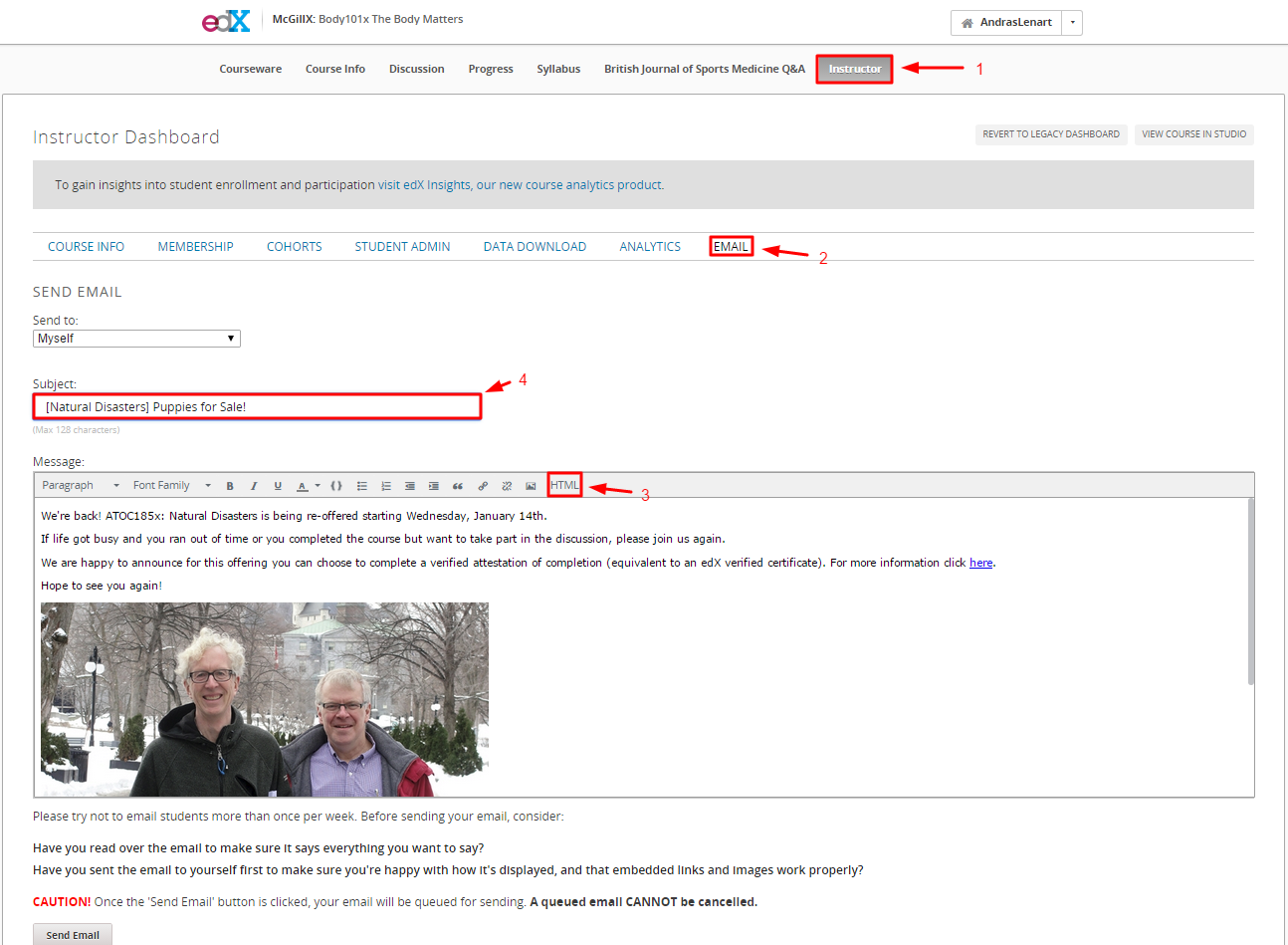
On the main course page:
- Click the instructor tab
- Compose the email using the HTML editor (copy and paste the template below)
- Test the email by sending it to yourself first (be sure to preview it in both Gmail and another email client such as Outlook)
Note
Outlook will often block images from being displayed
Note
The email Subject no longer automatically includes the course name ([Course Name] used to appear before emails automatically).
Template
<p>We're back! ATOC185x: Natural Disasters is being re-offered starting Wednesday, January 14th.</p>
<p>If life got busy and you ran out of time or you completed the course but want to take part in the discussion, please join us again.</p>
<p>We are happy to announce for this offering you can choose to complete a verified attestation of completion (equivalent to an edX verified certificate). For more information click <a href="https://www.edx.org/verified-certificate" target="_blank">here</a>.</p>
<p>Hope to see you again!</p>
<p><img src="https://courses.edx.org/c4x/McGillX/ATOC185x/asset/email_to_summer_professors_campus_600px.jpg" alt="picture of professors" /></p>
<p>Professors John Stix and John Gyakum</p>
<div align="center">
<p>Share this course</p>
<p>
<a href="http://www.facebook.com/sharer.php?u=https://www.edx.org/course/natural-disasters-mcgillx-atoc185x#.VH3YpzHF98E" target="_blank"><img src="courses.edx.org/c4x/McGillX/ATOC185x_2/asset/facebook-icon.png" alt="Facebook"/></a>
<a href="https://plusone.google.com/_/+1/confirm?hl=en&url=https://www.edx.org/course/natural-disasters-mcgillx-atoc185x#.VH3YpzHF98E" target="_blank"><img src="courses.edx.org/c4x/McGillX/ATOC185x_2/asset/google-plus-icon.png" alt="Google+"/></a>
<a href="http://twitter.com/share?url=https://www.edx.org/course/natural-disasters-mcgillx-atoc185x#.VH3YpzHF98E;text=Description" target="_blank"><img src="courses.edx.org/c4x/McGillX/ATOC185x_2/asset/twitter-icon.png" alt="Twitter"/></a>
</p>
</div>
Adding an Image to an Email
In studio.edx.org:
- upload the image to the course page with the following specifications:
- A unique name. Do not include spaces or special characters (!, &, ?) in the file name. Use underscores, hyphens, letters and numbers only.
- A width of 600px or less (!Important, do not try using html to resize the image, it will not work for email clients such as outlook)
- Copy the external URL
- Replace the highlighted portion of the html below with the external URL
"<img src="https://courses.edx.org/c4x/McGillX/ATOC185x/asset/email_to_summer_professors_campus_600px.jpg" alt="picture of professors" />"
- Replace the alt text with a short description of the picture
<img src="https://courses.edx.org/c4x/McGillX/ATOC185x/asset/email_to_summer_professors_campus_600px.jpg" alt="picture of professors" />